
Fair daily shares
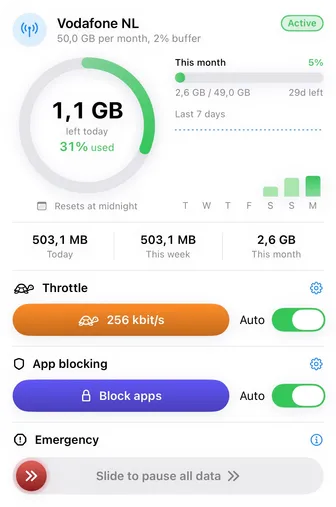
A 5 GB SIM for a 14 day trip becomes about 357 MB a day, so day 12 still has maps and messages. Savings from a light day carry into tomorrow.

DataSplit splits any data bundle into fair daily shares, warns you on the way, and can pause data before extra costs start. Every network on your iPhone gets its own budget.

For iPhone, iOS 18 or later. No account needed.
Wi-Fi at home, the SIM in your phone, the hotel network on a trip: every connection gets its own place in DataSplit, with its own rules.
5 GB for a two week holiday, 10 GB a month, 1 GB a day: enter what your plan gives you and when it renews. Connections without a limit can simply run free.
Every day gets a fair share of what is left. Warnings come early, heavy use can slow down first, and data can pause before the bundle runs over.
A 5 GB SIM for a 14 day trip becomes about 357 MB a day, so day 12 still has maps and messages. Savings from a light day carry into tomorrow.
Video pauses, chats keep flowing. Near today’s share, DataSplit can slow heavy use down first, so messages, mail, and maps stay available.
Tell DataSplit whether going over costs money. Where it does, an optional safety buffer holds back a few percent; where data simply stops, the last day can run free so nothing goes to waste.
When data runs low, the data hungry apps you picked can be blocked through Screen Time, so what is left goes to essentials. The block screen names the network and how much remains.
Three home screen widgets: usage rings, a seven day history, and a full overview. A Live Activity follows the current session on the Lock Screen.
Home Wi-Fi runs free, the holiday SIM gets a strict budget, and a dual SIM phone keeps two separate books. Each network remembers its settings, and new networks start unlimited and simply count, so nothing ever stops working unexpectedly.
A bundle that renews on the 14th, a 28 day prepaid cycle, a plan that resets at 6 in the morning: budgets follow your plan, not the calendar. Starting mid cycle? Enter what you already used.
Tethered laptops spend from the same bundle. DataSplit estimates hotspot traffic from the system counters and books it onto the SIM budget, clearly marked as estimated.
A ladder of notices at 50, 65, 80, 90, and 99 percent, a clear note the moment a budget runs over, one for every pause and resume, and a heads up when you switch networks. Every category has its own switch.
Counting, budgets, warnings, widgets, and history are free on every network, and stay that way. DataSplit Pro adds the enforcement, so the limit holds even when you are not watching.
Pro is a monthly or annual subscription, or a one time lifetime unlock with Family Sharing. Prices are shown in the app before you buy.
DataSplit is built the opposite way of most data apps: nothing about your usage leaves your phone, because there is no DataSplit server to send it to.
Data is counted on your phone and goes straight out. There is no DataSplit server in between.
DataSplit counts how much data is used, never what is in it. The local tunnel reads where a connection is going, only to deliver it; the destination is kept nowhere, and the content stays sealed.
Nothing to sign up for, nothing collected, nothing shared. Deleting the app deletes everything.
One thing does go elsewhere: while counting is on, name lookups use Cloudflare and Google public DNS, so names resolve on every network. They receive the lookups as any DNS provider would, and the privacy policy says exactly what they see.
DataSplit uses the network tools built into iOS to count data on the device, and iOS presents that kind of setup as a VPN. There is no VPN server: your traffic goes straight to the internet, its content is never read, and nothing about your usage leaves your phone. The one thing DataSplit does send elsewhere is name lookups, which use public DNS while counting is on; the next question covers it.
Yes, while data counting is on. Your device then uses Cloudflare (1.1.1.1 and 1.0.0.1) and Google (8.8.8.8) to turn names into addresses, because the servers a network hands out are not always reachable while counting runs. Those companies receive the names looked up and the address they come from, as any DNS provider would; DataSplit keeps no record of them. They handle the lookups under their own privacy terms: Cloudflare’s public resolver privacy page and Google Public DNS privacy. Turn data counting off and your usual DNS servers come back. On a company or campus network, addresses that only that network knows may not resolve while counting is on.
Counting, budgets, daily shares, the warning ladder, widgets, the Live Activity, history, and the network memory are free on any number of networks, and stay free. DataSplit Pro adds the enforcement: the automatic pause, the safety buffer, the slowdown, Screen Time app blocking, extra data unlocks, and the emergency stop. Pro is a monthly or annual subscription or a one time lifetime unlock, priced in the app.
With Pro, data pauses before the bundle runs over, and resumes at the next reset, or earlier if you raise the limit or unlock extra data. Pausing affects internet data only; regular cellular calls and SMS text messages keep working. The free version never pauses anything: it shows how far over you are and keeps warning.
No. DataSplit keeps working on its own: counting, warnings, pausing, and resuming all continue while the app is closed. Data is only counted while data counting is on; if it was off for a while, the app says so and lets you enter what was used in the meantime.
Yes, as an estimate. Hotspot traffic bypasses the counting path iOS gives apps, so DataSplit estimates it from the system’s own cellular counters and books it onto the SIM’s budget, marked as estimated.
Very close, but your carrier has the final word. Carrier meters add radio overhead and rounding, so DataSplit offers an optional safety buffer that pauses data slightly before the limit on plans where going over costs money.
Get DataSplit for iPhone and give every network its own budget. Questions are welcome anytime.